 GoFree Link
GoFree
GoFree Link
GoFree
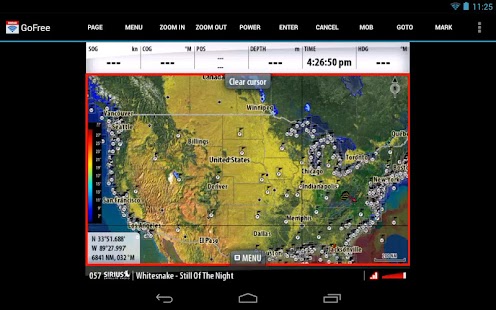
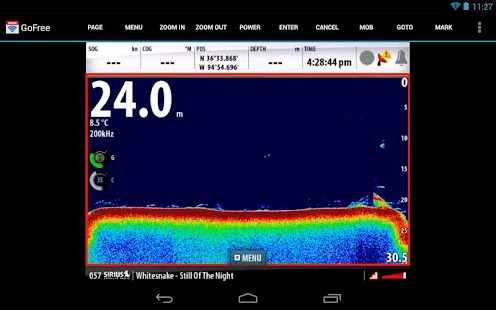
GoFree Link turns your device into a repeater screen for your Simrad, Lowrance or B&G Multifunction Display. View charts, sonar, radar direct from your tablet or phone.
Using a tablet you can do more than just view the screen. Take control of the Multifunction Display to carry out tasks including entering waypoints, adjusting radar settings and even controlling Sonic hub audio direct from your tablet.
The following Simrad Multifunction Displays are compatible with GoFree controller:
NSS, NSO evo2, NSS evo2, GO, GO XSE
The following Lowrance Multifunction Displays are compatible with GoFree controller:
HDS Gen2 Touch, HDS Gen2 (view mode only), HDS Gen3, Elite Ti
The following B&G Multifunction Displays are compatible with B&G GoFree controller:
Zeus Touch, Zeus² Glass Helm, Zeus2, Vulcan, Vulcan FS
If your MFD doesn't have Wifi then the WIFI-1 access point must be installed on the network to enable wireless connection. To find your nearest dealer or to check pricing visit http://www.gofreemarine.com
Instructions for use:
1. Download the GoFree Controller app to your device.
2. Once onboard the vessel, connect to the GoFree Wireless Network.
3. Run the GoFree Controller app and select which Multifunction display you would like to view and control.
Important to note:
GoFree Controller requires software version 2.5.42.77 or above.
Autopilot control is not enabled from the GoFree Controller app.
Using a tablet you can do more than just view the screen. Take control of the Multifunction Display to carry out tasks including entering waypoints, adjusting radar settings and even controlling Sonic hub audio direct from your tablet.
The following Simrad Multifunction Displays are compatible with GoFree controller:
NSS, NSO evo2, NSS evo2, GO, GO XSE
The following Lowrance Multifunction Displays are compatible with GoFree controller:
HDS Gen2 Touch, HDS Gen2 (view mode only), HDS Gen3, Elite Ti
The following B&G Multifunction Displays are compatible with B&G GoFree controller:
Zeus Touch, Zeus² Glass Helm, Zeus2, Vulcan, Vulcan FS
If your MFD doesn't have Wifi then the WIFI-1 access point must be installed on the network to enable wireless connection. To find your nearest dealer or to check pricing visit http://www.gofreemarine.com
Instructions for use:
1. Download the GoFree Controller app to your device.
2. Once onboard the vessel, connect to the GoFree Wireless Network.
3. Run the GoFree Controller app and select which Multifunction display you would like to view and control.
Important to note:
GoFree Controller requires software version 2.5.42.77 or above.
Autopilot control is not enabled from the GoFree Controller app.
Fotogalerie
-
Verze programu
GoFree
-
Poslední aktualizace od vývojáře
15. 6. 2017
-
Počet stažení za měsíc
0 ×
-
Velikost
22 MB
-
Potřeba instalace:
Ano
-
Web autora
-
Podporované jazyky
- Angličtina
Zdarma
Sdílet
Podobné programy


TIP: Stahují se vám programy pomalu? Změřte si rychlost svého internetového připojení.