 Health Maintain cardio recordings,E numbers,Calcs
2.9
Health Maintain cardio recordings,E numbers,Calcs
2.9
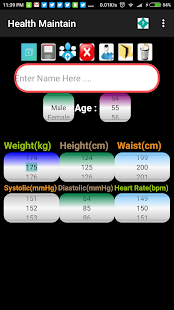
Health Maintain App offers a easy way to record, maintain, review, display and export a persons daily cardio readings, record any health issues/resolutions/medications and add calendar events to the default Android calendar. Allows for multiple people to be entered into the system. Hence can be used for family, professional, work monitoring of people/patients.Readings that can be entered include a persons Name, Age, Weight, Blood pressure readings and heart rate. These readings can be reviewed either directly, exported via csv file and displayed in a graph (only the last 20 readings are displayed in a graph).
Also contains calculations screen for calculations like BMI,BMR, a sci-calculator and information on E Numbers screen.Events page : Add any Health Events,requirements for the person in the system and add calendar appointments/events associated etc.
Allows for three separate sections to write the persons illness, resolution and medications. Events can be reused for different people, deleted, exported and emailed. Reminders, calendar events can also be added at the same time. When the App starts, if no existing person is found, enter your name a details to get started. Upon starting the last reading details of the initial person will be displayed. Use the dropdown box to select the last details of the selected person. A new reading can be recorded by clicking the Add New Record button. Enter the details via the dialing wheels, click the Save button to save the record. Click the Add New User button to add a new person and details, always click the Save button to save the details. Click the cancel button to stop entering a new record. Click the Delete User button to delete the user and their data from the App. Click the Delete record to delete the currently displayed record of the selected user. To display, export and email all readings go to the History menu option. In the History screen select the user and all their data will be displayed below. Click the graphs button to display a graph of the last 20 readings of the selected user. Click the export button to create a csv file of all the data selected persons data. Click the email button to send the export file via the selected method. The settings menu options enables default limit readings to be entered. The About/Help offers further information. Full free version with Ads.
Also contains calculations screen for calculations like BMI,BMR, a sci-calculator and information on E Numbers screen.Events page : Add any Health Events,requirements for the person in the system and add calendar appointments/events associated etc.
Allows for three separate sections to write the persons illness, resolution and medications. Events can be reused for different people, deleted, exported and emailed. Reminders, calendar events can also be added at the same time. When the App starts, if no existing person is found, enter your name a details to get started. Upon starting the last reading details of the initial person will be displayed. Use the dropdown box to select the last details of the selected person. A new reading can be recorded by clicking the Add New Record button. Enter the details via the dialing wheels, click the Save button to save the record. Click the Add New User button to add a new person and details, always click the Save button to save the details. Click the cancel button to stop entering a new record. Click the Delete User button to delete the user and their data from the App. Click the Delete record to delete the currently displayed record of the selected user. To display, export and email all readings go to the History menu option. In the History screen select the user and all their data will be displayed below. Click the graphs button to display a graph of the last 20 readings of the selected user. Click the export button to create a csv file of all the data selected persons data. Click the email button to send the export file via the selected method. The settings menu options enables default limit readings to be entered. The About/Help offers further information. Full free version with Ads.
Fotogalerie


-
Verze programu
2.9
-
Poslední aktualizace od vývojáře
29. 8. 2019
-
Počet stažení za měsíc
0 ×
-
Velikost
3,7 MB
-
Potřeba instalace:
Ano
-
Web autora
-
Podporované jazyky
- Angličtina
Zdarma
Sdílet
Podobné programy


TIP: Stahují se vám programy pomalu? Změřte si rychlost svého internetového připojení.