 Hear2Read Marathi Text->Speech
1.1.0
Hear2Read Marathi Text->Speech
1.1.0
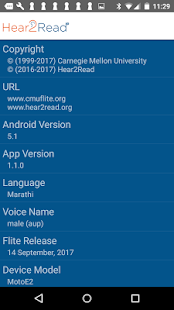
Hear2Read Ⓡ Marathi Text-To-Speech (TTS) plug-in engine is a joint development by www.Hear2Read.org and Carnegie Mellon University.
It uses Android OS framework for 3rd party Text To Speech engines such that it can be used with any with TTS-enabled App to Read Marathi text by listening to machine generated synthetic speech.
Our primary goal is to support reading books, web sites, e-mail, Word and text documents, SMS text, Facebook postings and WhatsApp messages etc. One can read Word or text documents using @Voice Aloud Reader (see below). It is not designed to work with MS Word or any other Office Apps using Talkback. This will be addressed in a future release.
At this time, it can speak Marathi (Devanagari) text and numbers written either in Devanagari or English script. English words embedded in Marathi text are spoken in English though not very well.
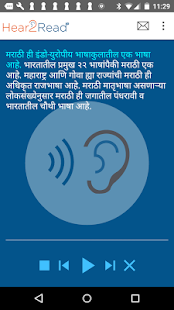
Hear2Read App is not intended to be a screen reader. It is primarily a TTS Engine. However, we do provide the ability to copy text strings (up to 250 characters) on the
App Home/Demo page and then speak it by touching the Play symbol. This is useful to read short WhatsApp or SMS messages.
Due to the Talkback restriction (see below), we recommend "@Voice Aloud Reader" screen reader (free App) since it detects the content language and then selects the appropriate engine rather than using the preferred engine and language under settings which is generally set to English.
The most frequent request that we get is how to read Web pages or E-mail. Once you have installed "@Voice Aloud Reader", please use the Android Share feature to
share the e-mail or web page content with @Voice which will load the web page or e-mail content in its buffer and then read it using TTS.
For Chrome browser, "Share" option is available under "More Options" button (three dots in upper right corner). Once you select the Share option, it brings up "Share
Via" menu. Select "@Voice Aloud Reader" from the list of the Apps. @Voice wiil display shared content on the screen. Once you see the entire content, click Play
button to read the content by listening.
Other Apps, such as "Voice Dream Reader", allow the user to select and associate a TTS Engine and language for the particular content. This selection is used instead
of the preferred engine and language set under settings.
Android Talkback and certain Apps (such as GoRead book reader) use the preferred TTS Engine and language selected under settings. For these Apps, users need to
select Hear2Read Engine and then select Marathi.
Since it does not speak English well, we recommend leaving the "preferred TTS Engine" as Google English TTS (default setting) unless you are able to understand are comfortable with the English spoken by Hear2Read App.
To change the preferred TTS Engine setting:
Select Settings -> Language and Input -> Text-to-speech Output
Select Marathi Hear2Read as the Preferred engine
Touch the Gear symbol to display Language settings
If it does not show Marathi under Language, then touch Languages.
Select Marathi in the Pop Up box.
Back on the Text-to-speech output screen, touch "Listen to an example" to confirm. You should hear a Marathi sentence.
Requires devices with 1 GB (or more) RAM and Android 4.4 or higher.
Permissions - SD card READ/WRITE access is required to store downloaded voices.
We welcome your feedback. Please send comments and questions to Feedback@Hear2Read.org.
We invite users to rate the App. If you so, please add review comments as to the reason for the rating and how it can be improved it. If you like the App, please spread the word.
Thanks,
Hear2Read team
Note: Hear2Read is a registered trademark.
It uses Android OS framework for 3rd party Text To Speech engines such that it can be used with any with TTS-enabled App to Read Marathi text by listening to machine generated synthetic speech.
Our primary goal is to support reading books, web sites, e-mail, Word and text documents, SMS text, Facebook postings and WhatsApp messages etc. One can read Word or text documents using @Voice Aloud Reader (see below). It is not designed to work with MS Word or any other Office Apps using Talkback. This will be addressed in a future release.
At this time, it can speak Marathi (Devanagari) text and numbers written either in Devanagari or English script. English words embedded in Marathi text are spoken in English though not very well.
Hear2Read App is not intended to be a screen reader. It is primarily a TTS Engine. However, we do provide the ability to copy text strings (up to 250 characters) on the
App Home/Demo page and then speak it by touching the Play symbol. This is useful to read short WhatsApp or SMS messages.
Due to the Talkback restriction (see below), we recommend "@Voice Aloud Reader" screen reader (free App) since it detects the content language and then selects the appropriate engine rather than using the preferred engine and language under settings which is generally set to English.
The most frequent request that we get is how to read Web pages or E-mail. Once you have installed "@Voice Aloud Reader", please use the Android Share feature to
share the e-mail or web page content with @Voice which will load the web page or e-mail content in its buffer and then read it using TTS.
For Chrome browser, "Share" option is available under "More Options" button (three dots in upper right corner). Once you select the Share option, it brings up "Share
Via" menu. Select "@Voice Aloud Reader" from the list of the Apps. @Voice wiil display shared content on the screen. Once you see the entire content, click Play
button to read the content by listening.
Other Apps, such as "Voice Dream Reader", allow the user to select and associate a TTS Engine and language for the particular content. This selection is used instead
of the preferred engine and language set under settings.
Android Talkback and certain Apps (such as GoRead book reader) use the preferred TTS Engine and language selected under settings. For these Apps, users need to
select Hear2Read Engine and then select Marathi.
Since it does not speak English well, we recommend leaving the "preferred TTS Engine" as Google English TTS (default setting) unless you are able to understand are comfortable with the English spoken by Hear2Read App.
To change the preferred TTS Engine setting:
Select Settings -> Language and Input -> Text-to-speech Output
Select Marathi Hear2Read as the Preferred engine
Touch the Gear symbol to display Language settings
If it does not show Marathi under Language, then touch Languages.
Select Marathi in the Pop Up box.
Back on the Text-to-speech output screen, touch "Listen to an example" to confirm. You should hear a Marathi sentence.
Requires devices with 1 GB (or more) RAM and Android 4.4 or higher.
Permissions - SD card READ/WRITE access is required to store downloaded voices.
We welcome your feedback. Please send comments and questions to Feedback@Hear2Read.org.
We invite users to rate the App. If you so, please add review comments as to the reason for the rating and how it can be improved it. If you like the App, please spread the word.
Thanks,
Hear2Read team
Note: Hear2Read is a registered trademark.
Fotogalerie
-
Verze programu
1.1.0
-
Poslední aktualizace od vývojáře
19. 9. 2017
-
Počet stažení za měsíc
0 ×
-
Potřeba instalace:
Ano
-
Web autora
-
Podporované jazyky
- Angličtina
Zdarma
Sdílet
Podobné programy

TIP: Stahují se vám programy pomalu? Změřte si rychlost svého internetového připojení.