 Volume Slider Like Android P Volume Control
3.5
Volume Slider Like Android P Volume Control
3.5
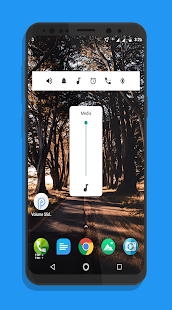
Je to nové vertikální ovládání hlasitosti pro nastavení hlasitosti v Androidu P.
Volume Slider umožňuje přesně stejný ovládací prvek pro ovládání hlasitosti pro všechna zařízení Android od Androidu 4.1+ a vyšší.
Nečekejte na oficiální podporu Androidu P pro vaše zařízení. Nainstalujte aplikaci Volume Slider a získáte podobné ovládání hlasitosti pro váš telefon jako v Android P
Volume Slider vám poskytne vertikální ovládání hlasitosti jako nový Android P
App reviews by android popular websites:
XDA:
App brings the new volume control look to any Android 4.0+ device. The app also adds a bunch of customization options for the volume slider. You can put it in different places on the screen or put it in the notification shade if you’d prefer. Don’t wait for Android P to get the latest features
https://www.xda-developers.com/android-p-volume-slider-app/
Android Headlines
App called Volume Slider-P Volume Control – brings the aesthetics of that tool to any Android device running version 4.0.3 or newer, give this app a shot for anybody looking to capture that Android P feel just a bit earlier than others
https://www.androidheadlines.com/2018/03/new-app-gives-users-android-p-like-volume-controls.html
Droidviews, android police and many more
How to Get Volume Slider on Any Android
http://www.droidviews.com/android-p-volume-slider-on-any-android/
https://www.googlewatchblog.de/2018/03/android-p-volume-slider/
https://9to5google.com/2018/03/15/how-to-android-p-volume-slider-launcher-older-devices-android-basics/
FEATURES
◇ Android P like Floating Volume Panel with default duration for it.
◇ Volume Slider Position on screen to reach out the seekbar easily
◇ Color for Volume Notification bar and for Widget too.
◇ Color option for Toggles icon on notification bar
◇ Install and explore more..
INTERACTIVE WIDGETS
Android P Volume Slider Widgets are very similar of Volume Toggles in Notification bar and provide the same functions.
Install it from the market, then install manually the widget to the desired location of the desktop in standard way for your device:
✔ Long touch on your home screen or click the menu button;
✔ Choose "Add";
✔ Click on "Widgets";
✔ Choose the Android P Volume Slider Widget.
If Widget is not in the widgets list:
✔ Make sure that it's installed into internal memory! Widgets do not work from SD card;
✔ Restart your system.
PERMISSIONS
Please note that the following permissions are required to use the app (the function/reasons are provided in brackets):
✔ Do Not Disturb Permission(Android 7+ devices require this permission to change the volume level to 0 or increase it from 0)
✔ System Overlay Permission(Floating Volume Control panel runs on top of any running apps and it require this permission)
✔ Run at startup (restore settings after startup)
NOTE: Starting from Android version 4.1.x (Jelly Bean) in the standard firmware channels "System", "Alert" and "Ringer" are tied.
They can not be set separately. This is not the reason to blame the app.
At the same time, in some versions of firmware (e.g. in Samsung), these channels are NOT tied. Therefore the App have the opportunity to display and to adjust them separately, if possible.
Please visit www.yogeshdama.com for more details.
If you like the app, don't forget rate 5 star ★★★★★ or review.
for issues and suggestions please email us at yogi.306@gmail.com
Please help us to translate app to reach more people.
https://www.localize.im/v/33j
Volume Slider umožňuje přesně stejný ovládací prvek pro ovládání hlasitosti pro všechna zařízení Android od Androidu 4.1+ a vyšší.
Nečekejte na oficiální podporu Androidu P pro vaše zařízení. Nainstalujte aplikaci Volume Slider a získáte podobné ovládání hlasitosti pro váš telefon jako v Android P
Volume Slider vám poskytne vertikální ovládání hlasitosti jako nový Android P
App reviews by android popular websites:
XDA:
App brings the new volume control look to any Android 4.0+ device. The app also adds a bunch of customization options for the volume slider. You can put it in different places on the screen or put it in the notification shade if you’d prefer. Don’t wait for Android P to get the latest features
https://www.xda-developers.com/android-p-volume-slider-app/
Android Headlines
App called Volume Slider-P Volume Control – brings the aesthetics of that tool to any Android device running version 4.0.3 or newer, give this app a shot for anybody looking to capture that Android P feel just a bit earlier than others
https://www.androidheadlines.com/2018/03/new-app-gives-users-android-p-like-volume-controls.html
Droidviews, android police and many more
How to Get Volume Slider on Any Android
http://www.droidviews.com/android-p-volume-slider-on-any-android/
https://www.googlewatchblog.de/2018/03/android-p-volume-slider/
https://9to5google.com/2018/03/15/how-to-android-p-volume-slider-launcher-older-devices-android-basics/
FEATURES
◇ Android P like Floating Volume Panel with default duration for it.
◇ Volume Slider Position on screen to reach out the seekbar easily
◇ Color for Volume Notification bar and for Widget too.
◇ Color option for Toggles icon on notification bar
◇ Install and explore more..
INTERACTIVE WIDGETS
Android P Volume Slider Widgets are very similar of Volume Toggles in Notification bar and provide the same functions.
Install it from the market, then install manually the widget to the desired location of the desktop in standard way for your device:
✔ Long touch on your home screen or click the menu button;
✔ Choose "Add";
✔ Click on "Widgets";
✔ Choose the Android P Volume Slider Widget.
If Widget is not in the widgets list:
✔ Make sure that it's installed into internal memory! Widgets do not work from SD card;
✔ Restart your system.
PERMISSIONS
Please note that the following permissions are required to use the app (the function/reasons are provided in brackets):
✔ Do Not Disturb Permission(Android 7+ devices require this permission to change the volume level to 0 or increase it from 0)
✔ System Overlay Permission(Floating Volume Control panel runs on top of any running apps and it require this permission)
✔ Run at startup (restore settings after startup)
NOTE: Starting from Android version 4.1.x (Jelly Bean) in the standard firmware channels "System", "Alert" and "Ringer" are tied.
They can not be set separately. This is not the reason to blame the app.
At the same time, in some versions of firmware (e.g. in Samsung), these channels are NOT tied. Therefore the App have the opportunity to display and to adjust them separately, if possible.
Please visit www.yogeshdama.com for more details.
If you like the app, don't forget rate 5 star ★★★★★ or review.
for issues and suggestions please email us at yogi.306@gmail.com
Please help us to translate app to reach more people.
https://www.localize.im/v/33j
Fotogalerie


-
Verze programu
3.5
-
Poslední aktualizace od vývojáře
25. 12. 2019
-
Počet stažení za měsíc
1 ×
-
Velikost
1,7 MB
-
Potřeba instalace:
Ne
-
Web autora
-
Podporované jazyky
- Angličtina ,
- Čeština ,
- Holandština ,
- Chorvatština ,
- Němčina ,
- Rumunština ,
- Ruština ,
- Slovenština ,
- Španělština ,
- Vietnamština
Cena: 19,99 Kč
Sdílet
Podobné programy


TIP: Stahují se vám programy pomalu? Změřte si rychlost svého internetového připojení.